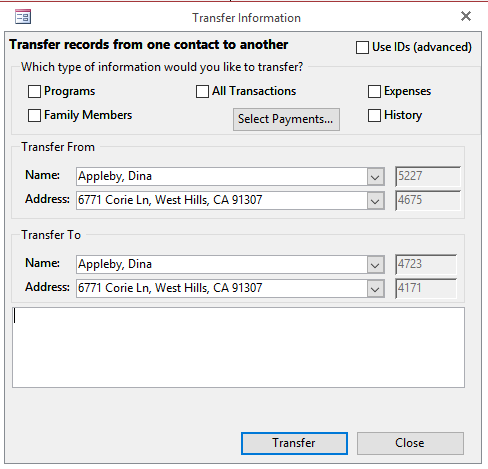
Use this tool to transfer information from one contact to another. This is especially useful when you have a duplicate and need to consolidate all the information into one contact before deleting the other. You can choose what information to transfer--Programs, Family Members, Transactions, Expenses and History.
Click Tasks > Maintenance > Transfer Info to access this feature.
The white box on the bottom will show you what has been transferred so far. You can choose to use the names and addresses of the contacts you want to transfer from and to, or you can choose to use the Contact ID numbers. To use the Contact ID numbers, check off the Use ID's (advanced) box in the top right hand corner.
You can also choose to transfer specific payments only, by clicking the Select Payments... below the All Transactions check box.
Note: When transferring information, the person you are transferring From, loses all that information and it goes to the person you are transferring To. The "Transfer From" contact info will not be deleted or modified, only the Information (Programs, Family Members, Transactions, etc.) are moved (transferred).
When selecting individual payments to be transferred, if those payments are applied to bills, those bills ("Applied Bills") are transferred as well. If the "Applied Bills" have other payments ("Related Payments") applied to them, the "Related Payments" are transferred as well. However, if the "Related Payments" are split and are also applied to other bills ("Related Applied Bills"), the selected payment will not be Transferred. The only way to Transfer such a payments (which has "Related Applied Bills"), is to transfer All Transactions.
Any cards on file are also not transferred.
To check all your contacts for duplicates, see this KB article.